Free Saturday Focus Sessions continue at Bergen County Camera

Focus sessions are Free and will take place in the Westwood store from 9:30 – 10 am and our Englewood location from 10:30 am – 11:00 am (except social media profile session).  All sessions will allow for question and answers. Please bring your camera and any images along that you have questions about.

February 26 – Westwood Only – How to get a great LinkedIn or social media profile picture. With the growth of social networking and its growing importance in business, it has become important to make a good first impression online . . .  this starts with a great profile picture. During our 30 minute session, we’ll talk about lighting, posing, flash, studio lights, backgrounds and more. We’ll also talk about shooting pictures with the proper audience in mind – a LinkedIn profile picture may look nothing like your Facebook, MySpace or Twitter profile picture depending on how you use each.

Not ready to go shoot your own portrait? For $50 a professional photographer will take your portrait and provide about 8 images on a CD for you to use. If you are planning to have your photograph taken, please be sure to dress for the type of portrait you are seeking – social networking, professional networking etc. Please call the store if you have any questions – 201-664-4113.

Here’s the schedule going forward
Mar 5 – Digital Video with your DSLR
Mar 12 – Great Party Photos
Mar 19 – Sensor Cleaning – howto
Mar 26 -Night Time Photography – Time Exposures
Apr 2 – What you need for Flower Photography
Apr 9 – Micro 4/3’s cameras what’s it all about

These are free events – be sure to bring a friend along if you’d like.

Winter Shooting Tips 2011

Please feel free to leave your own suggestions by commenting on this post.

Shooting in the winter (especially when snowing, sleeting or below freezing) can certainly be a challenge.

Here are a few pointers to make your winter shooting that much easier.

Batteries – The number of frames you can take can drop dramatically the colder it gets especially below 30. When you plan on shooting outside for an extended period of time keep one or two spare batteries in a coat or pants pocket that is warm and close to the body. As soon as your low battery indicator flashes stop shooting and rotate a warm battery into the camera.

Rain, Sleet and Snow – Always keep an inexpensive plastic bag in the bottom of your camera bag. If you get caught out in precipitation simply put your entire camera bag inside and make your way back. If you need to shoot in rain, sleet, or snow you can always purchase an Aquapac or any protective rain-sleeve to protect your camera and lens from damage.

Polarizing Filters – Great for reducing glare especially off of snow and glass. Colors always look better when glare is reduced. Don’t stack your filters and remember to remove your polarizer when it gets darker or you move inside. Always remember – a polarizer can cut the amount of light entering the lens in half ( 1 f-stop).

Hand Warmers – this years addition to the list comes from outdoor sports enthusiasts. Available at most sporting goods stores and for about $2 can keep your hands warm for 4 – 6 hours. Special versions are available to keep your toes warm as well.

Additional Winter Picture taking resources

Getting snow that’s white not gray – read this helpful how-to – How to get white snow – Winter shooting tips

Stay warm and have fun shooting pictures throughout the winter. Need some ideas? Remember to visit Bergen County Camera’s “Where to take pictures” page.

Holiday Picture Taking Challenges

Thanks to everyone who contributed to our list of greatest holiday photo challenges. Please feel free to post a comment if you have any thoughts or additional questions!

Happy Holidays!

General Lighting Suggestions

  • Balance daylight, flash and Christmas lights
  • Indoor Photography – Proper Flash Technique

For those of us looking to get a nice balanced exposure when using flash here’s a few things to try. If you camera has a flash compensation (not exposure compensation), try dialing back the power to – 0.7 or -0.5 to moderate the impact the intense flash will have in your image. Turn up your ISO to 400 or 800, this will brighten the backgrounds up and make your pictures look more natural. Not sure how to proceed, check your manual or stop by for a quick tutorial. To balance daylight, flash and Christmas lights in the same image can be a challenge that in some cases goes beyond what your camera may be capable in a single image. For those who are interested, High Dynamic Range (HDR) photography takes the best highlights, shadows and overall exposure for different image elements from two or more images. If you are using an external flash, you can buy various diffusers that help smooth and even out the light put out by the flash. Look on our calendar of events soon for our list of January free “Focus Sessions” that may include Flash Photography and Flash Diffusion. Focus Session take place on various Saturdays at 9:30 am in Westwood and 10:30 am in Englewood and last about 30 minutes.

For indoor shots be sure to remove your polarizer filter – just leave your protective UV on your lens – never stack filters.

Nighttime Photography of Holiday Lights

Rockefeller Center Tree with point and shoot

Photo: Gerri Facchine

To get nighttime photographs of Christmas lights here are some recommended items – warm gloves, hand warmers, hat, an extra battery in a warm pocket, tripod & camera shutter release. The self timer can be used to trigger the shutter in a pinch without shaking the camera. Just set it to two seconds, gently trigger the shutter and make sure you are clear of the camera when the shutter trips (this minimizes any potential shake). It’s also a good idea to bracket your exposures. This means take a variety of exposures so that you will be able to choose the best one. You can easily make these adjustments using the exposure compensation ( the +/- button) on your camera. Take the normal exposure (if too dark – try +1, +2 or +3) (if too light try -1, -2 or -3 ).  With this approach you should be able to capture just the right exposure. If you are doing extended night photography on a really cold night, or you left your camera in a cold car for an extended period, the battery life will be shortened – that’s why you keep a backup in a warm pocket so that you can keep shooting.

Even a point and shoot camera can capture nighttime images (see Rockefeller Center above) just as long as the camera is steadied on a mini tripod or solid surface.

If you have a subject in the foreground, you can use your camera’s slow synch feature with the flash to illuminate the foreground and background. Don’t forget to put your flash back to the normal mode when you are done. Not sure how to set your camera – check your manual or stop by either Bergen County Camera location for a quick tutorial.

Getting Better People Shots

  • Making sure everyone looks good
  • Kids Opening Presents
  • How to photograph children so they look natural – lots of pictures my kid turning or running away from the camera
  • Catching good candid shots of people without food or drink in the way

One of the first suggestions you will hear our store manager Paul Carretta suggesting is be ready for the shot. This means your camera is on, your lens cap is off, and your camera is zoomed to the widest setting so you a ready to go at a seconds notice. How many times have you or have you seen someone pick up a camera to take a picture with a lens cap on or the camera turned off! If you have a red-eye reduction mode on your camera that produces a barrage of flash and lights, turn if off – especially with large groups. With red-eye flash modes, most people are uncertain which flash is the real flash and tend to be in many states of preparedness – this hurts your candid photography. A little preparation goes a long way to getting candid uncluttered images. When setting up, be aware of your background, watch for plants behind people heads, do some quick cleanup of anything that may clutter up your image.

Use your high speed setting to take a rapid sequence of images – just be sure to pick the best one. Choosing the best image can be a challenge, so if you are having a tough time, stop by the store we’ll be glad to help.

When it comes to opening presents, candid photography in this situation is usually the best mixed in with a few attempts to pose the shot. Often with kids the more you can blend in the smoother this whole process will go. Experiment with flash and existing light – no flash – high ISO which will help you blend in more to capture those candid moments. Always take a few test shots to make sure your settings work. Take lots of shots and review your results, get a critique and modify your technique as you learn what works and what doesn’t”

How to capture a performance – plays and ballet

How to photograph a holiday performance

An adjustable SLR camera with a fast lens, tripod or monopod, with a powerful add on flash is your best bet to capture performance photography. Always check the venue to be sure what type of photography and whether flash is allowed. A very important reminder is your built in flash on Point and Shoot and SLR cameras reach no further than 10 feet! If you attempt pictures further away, you capture a very dark image and the brightly illuminated seat back just in front of you. A hot shoe mounted flash can boost your flash range to over 50 feet.

With an add on flash or with built in flash closer than 12′

A monopod is great for taking the weight off and allowing your camera to be in a ready position. Shoot with your camera on program to start and make adjustments with your +/- (exposure compensation) depending on whether your pictures are looking too bright or too dark. If you are using your built in flash try raising your ISO – with a powerful shoe mounted flash try ISO 800 or higher.

Without flash

A monopod, fast (low f number lens) this is where a 50mm f1.4 lens can greatly enhance your existing light photography in combination with a higher ISO – ( 800, 1600 or 3200). Just be aware that the higher you raise your ISO the more noise (like film grain) your image will have. Raise the ISO only high enough to capture your subject. The example above was photographed with a 85mm lens at ISO 400 at 1/125th at f2.8.  If you lens is a f5.6 you would need to set your ISO to 1600 to achieve the same f-stop and shutter speed. Another tip is to shoot at the peak of action (i.e. someone is neither going up or going down for a brief instant) or to wait for a lull in the action.

Adobe updates Camera Raw to 6.3 and Lightroom to 3.3

Adobe Labs has completed beta testing of Adobe Camera Raw version 6.3  (adds support for several newer digital cameras). You can get this update by using the check for updates option in your Adobe software or by visiting the Adobe Labs Camera Raw page for this download. The Adobe Labs Camera Raw page is the place to visit for the latest ACR release and beta test versions when available.

Newly supported camera models include: 

Canon PowerShot G12
Canon PowerShot S95
Nikon D7000
Nikon Coolpix P7000
Nikon D3100
Olympus E-5
Panasonic DMC-GF2
             Panasonic DMC-GH2
             Pentax K-5
Pentax K-r
Ricoh GXR, GR LENS A12 28mm F2.5
Samsung NX100
Samsung TL350 (WB2000)
Sony A560
Sony A580

Lightroom 3.3 has just been relased after completion of beta testing. You can get this update by checking for updates inside Lightroom.

Learn More – Digital Camera Color Accuracy – Gamut

gamut_purp_correct.
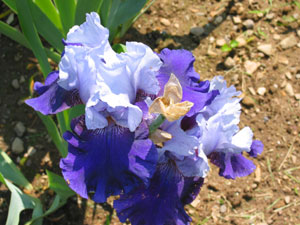
The Purple Iris the way I saw it and my Minolta Dimage captured it.

gamut_purp_incorrect
The Purple Iris as captured by my Canon G2.

Although this story was originally posted in 2002 it still applies today. Not all colors can be captured by a digital camera sensor.

Most of us have taken hundreds of pictures with our digital cameras without giving a thought to the crisp brilliant color images that we’ve captured. With few exceptions digital cameras produce very accurate renditions of what we see. There are times when digital cameras may cause some problems with color. This is especially important for people photographing flowers, artwork and dyed fabrics. Read on to find out more.

Have you ever taken a picture with your digital camera and the color looks nothing like what you saw? Digital cameras use a light sensitive chip to capture color & light. The sensitivity of these chips varies from camera to camera but as a general rule they have difficulty dealing with rich saturated tones.

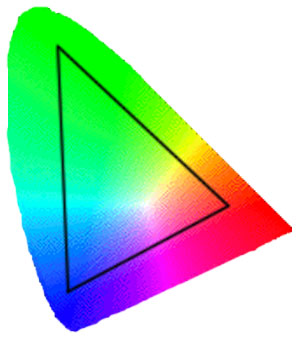
Why does this happen? First, most of us work with RGB images, which means our images are made up of Red, Green and Blue components. Your camera is sensitive to a range of colors called the gamut. Let’s say your digital camera can capture the colors inside the triangle below. If the object your taking a picture of has a color that lies outside the GAMUT of your camera, your camera automatically chooses a color that is close which lies inside the triangle. In the case of our deep purple Iris flowers the closest color happens to be a shade of blue.

colorspace1

colorspace2

The diagram on the bottom shows the deep purple Iris flower we saw and how the camera chose the closest available color which is actually more of a blue color.

Adobe Labs – Adobe Camera Raw & Lightroom Beta

Adobe Labs is currently beta testing Adobe Camera Raw Release Candidate version 6.3 to accommodate several newer digital cameras. This is an Adobe Labs beta product so there can be some issues but for someone who’s just purchased a new camera without current Adobe Camera Raw support, you may want to give it a try. Rest assured though a full tested version will be released soon. If you’d like to try the beta software visit the Adobe Labs Camera Raw page for this download. Please feel free to offer you feedback on this beta product by using the link from the Adobe Labs Camera Raw page listed above.

Newly supported camera models include:

  • Nikon D7000
  • Nikon Coolpix P7000
  • Nikon D3100
  • Canon PowerShot S95
  • Canon PowerShot G12
  • Panasonic Lumix DMC-GH2
  • Samsung NX100
  • Samsung TL350 (WB2000)

Lightroom 3.3 is in beta and is also available from Adobe Labs.

Fall Foliage Photography – State Hotlines & Tips

Acadia National Park Fall Foliage

Acadia National Park – Maine

Foliage Photography Tips for great pictures

Filters

For digital there is really only one “must have” filter to bring along for great fall foliage pictures – a polarizer. A polarizer creates dramatic fall foliage pictures by darkening the sky, increasing contrast and deepening colors and removing the sheen from the leaves. Most other filter effects such as, enhancing reds and oranges, sepia and graduated effects can be easily created in Photoshop. Your standard protective UV filter should be removed before putting your polarizer on – never stack filters. Also, don’t forget to remove your polarizer when you move back inside as it reduces light by one to two f-stops.

A second type of filter is an enhancing filter which does just what the name implies – enhances – especially the bright primary colors of autumn (reds, oranges and browns).  A third filter is a Color / Neutral Graduated filter which utilizes a color (or gray) that gradually diminishes from dark to light across the filter. These filters are often used to deepen the sky or to balance the exposure between foreground and background, which helps you keep the sky blue rather than blown out.

Tips

  • Nothing takes away from foliage more than a bright white overcast sky. In these situations, try to reduce the amount of sky in your images.
  • Dramatic storm clouds of autumn thunderstorms interspersed with blue sky make a stunning backdrop for the brilliant colors of fall especially when the vivid colors are brought out with a polarizer.
  • Use a tripod for the sharpest possible image to allow an ISO of 100 or 200 and use a remote release or self timer to prevent motion when pressing the shutter.
  • Colors are warmer and can be more dramatic closer to sunrise and sunset. The 1 hour before and after both sunrise and sunset are considered by many to be the “magic hours” where you get an amazing quality of light.
  • Experiment, take lots of pictures and above all have fun!
  • Since your shooting more with your digital camera, be sure to edit down before showing off your work to family and friends
Once you’ve assembled your camera and a few filters, all you’ll need is foliage at the peak of color. We’ve assembled a list of state hotlines below to help schedule your trip. Need some ideas for places to shoot, be sure to visit Bergen County Camera’s Where to take great Pictures page. Have some suggestions of your own please send us an email and we’ll include your suggestions.

Fall Foliage Websites

The Foliage Network

Fall Foliage Hotlines – click on a state below

New Jersey 
mid to late October 
Connecticut
 Late Sep - mid October 
Maine 
Early Sep - mid October
Massachusetts
October 
New Hampshire 
Late Sep - mid October
New York
Late Sep - late Oct
Pennsylvania 
Early October
Vermont 
Early Sep-Late October
Virginia 
Sep - Late Nov
Delaware 
Late October
Maryland 
Late Sep Late October
Rhode Island 
Late Sep - mid October

NJ Photo Expo 2010 – Focus Sessions Announced

NJ Photo Expo signup button

This years expo takes place on September 25, 2011 – Bergen County Camera’s NJ Photo Expo

The NJ Photo Expo October 3, 2010 at the Park Ridge Marriott features more than 20 Focus Sessions on topics ranging from Apertures to Zooms. These include:

  • “Nikon Lens Technology” – Join Nikon’s Technical Sales Representative, Christopher Knapp, as he demonstrates the benefits and technology of the Nikon Lens systems available to both DX and FX lines.
  • “Nikon Flash Technology” – Join Nikon’s Technical Sales Representative, Christopher Knapp, as he demonstrates and discusses the Nikon flash system.
  • “Editing with the Nikon System” – Join Nikon’s Technical Sales Representative, Christopher Knapp, as he demonstrates the new Nikon ViewNX2 and CaptureNX 2 software, showing you how to efficiently manage your editing workflow.
  • “Quality of Light in Your Photography” – presented by Expo Imaging, Lumiquest & Quantum
  • “The Canon Wireless Speedlight Studio – Start to Finish in 20 Minutes or Less!” – presented by Canon Cameras
  • “Choosing the Right Camcorder” – presented by Canon Video
  • “Landscape Photography Techniques with Canon TC-80N3” – presented by Canon Cameras
  • “Stepping Up to Larger Size Printing with Canon” – presented by Canon Printers
  • “Nikon Lens Technology” – Join Nikon’s Technical Sales Representative, Christopher Knapp, as he demonstrates the benefits and technology of the Nikon Lens systems available to both DX and FX lines.
  • “Nikon Flash Technology” – Join Nikon’s Technical Sales Representative, Christopher Knapp, as he demonstrates and discusses the Nikon flash system.
  • “Editing with the Nikon System” – Join Nikon’s Technical Sales Representative, Christopher Knapp, as he demonstrates the new Nikon ViewNX2 and CaptureNX 2 software, showing you how to efficiently manage your editing workflow.
  • “The Leica S2 System” – presented by Leica
  • “The Leica M9 System” – presented by Leica
  • “Giottos & baLens Products” – presented by HP Marketing
  • “Casio: A Unique Brand in Cameras Today” – presented by Casio
  • “Nature & Wildlife Photography with John Isaac” – presented by Olympus
  • “What Will You Create with Your Olympus PEN?”  – presented by Olympus
  • “The Diamond Warranty: Why it’s a Good Choice” – presented by Mack Warranty
  • “Travel: Getting Your Gear Safely to Your Destination” – presented by Think Tank
  • “Lowepro Bags – No Excuses” – presented by Lowepro
  • “The Sony A33 System” – presented by Sony
  • “The Sony A55 System” – presented by Sony
  • “Photographic Techniques” – presented by Sony
  • “Capture Your Memories in Stunning 3D” – Presented by Panasonic
  • “Sports Shooting with a Long Zoom” – Presented by Panasonic
  • “It’s a Small World – Intro to Micro 4/3 & Touch Shooting” – Presented by Panasonic
  • “Creative Foliage Photography with a Point & Shoot” – presented by Panasonic

Scheduling will be provide at the event signup and are first come first served and limited to about 35 people each.

Nik Demo Day & Seminars – Sept 25 11am – 4pm

Nik software

Register for Nik Software Demo - Saturday September 25 - Westwood in Westwood, NJ  on Eventbrite

Nik Software Demo Day 11 – 4 pm, Sat, Sept 25

Two presentations – 11:00 am – 12:15 pm and 2:00 – 3:15 pm

Nik Software Tools, Techniques and Tips for creating your best digital images.

Join us as we explore the various uses and applications of Nik Software within a digital workflow. This seminar will discuss how editing and retouching images can be fun, easy and enjoyable, and result in greater creativity coming through in your photography.

The class will begin with a basic introduction to Nik Software’s collection of plug-ins for Photoshop and proceed through demonstrations of their specific uses. Attendees of this seminar will learn how to trouble shoot images and correctly solve them with the proper Nik Software product.

Nik Software, Inc. is a privately held company that develops software solutions for the growing digital imaging and photography markets. Established in 1995, Nik Software has become the recognized leader in digital photographic filter development and produces award-winning technology and software products for digital photography and imaging professionals including U Point® technology, Dfine®, Viveza®, Color Efex Pro, Silver Efex Pro, and Sharpener Pro software.

Presentations at 11am or 2pm choose one on your registration form

Exploring HDR Photography with Nik Software’s HDR Efex Pro

Join Victor Ha of Nik Software as he reveals the technology and creative possibilities behind Nik Software’s latest creation: software for high dynamic range (HDR) imaging!  Victor will explain the techniques of how to properly shoot HDR for the best results, and then demonstrate an exciting new software product for creating realistic to artistic HDR images.  The software is easy-to-use and has been designed for photographers of all levels, with one-click style presets as well as powerful and innovative controls for advanced editing and experimentation.  Join us as we explore the photographic possibilities of HDR!

Nik Software, Inc. is a privately held company that develops software solutions for the growing digital imaging and photography markets. Established in 1995, Nik Software has become the recognized leader in digital photographic filter development and produces award-winning technology and software products for digital photography and imaging professionals including U Point® technology, Dfine®, Viveza®, Color Efex Pro™, Silver Efex Pro™, and Sharpener Pro™ software.

About the Photographer

Victor Ha, Nik Software’s Channel Sales Assistant Manager, is a former professional photographer of 8 years. A transplanted Californian just recently relocated to New York, he has spent the past three years presenting Nik Software to photographers in the US, Canada and Australia. Well-versed in the demands of today’s working professional, Victor takes a very practical approach in applying Nik Software to his workflow and showing others how they can incorporate elements of his workflow within their own.

Please choose one session to attend ( presentations will be the same)

Register for Nik Software Demo - Saturday September 25 - Westwood in Westwood, NJ  on Eventbrite