Fireworks Photography Tips – July 2011

Where to photograph fireworks
Bergen Record guide to Independence Day Celebrations

Star Ledger guide to Independence Day Celebrations

Here are some basic starting points

If you have any questions, stop by the store, email or call. We’re here to help. Please let us know if you get some great shots we’d love to see!
Please feel free to leave your comments and suggestions. Have a great 4th of July Holiday weekend from all of us at BCC.

Find a fireworks display on NJ.com’s July 4th events page

Tripod
Electronic release (available for most cameras at BCC) or 2 second self timer to eliminate the motion caused by pressing the shutter button.
Manually set your camera ISO to 100 (You do not want Auto ISO)
Lens Choice – Wide Angle Zoom to frame what you’d like to capture
Auto White Balance or Daylight
Set your lens to manual focus then focus to infinity (take a test image and make sure things are sharp)
Set your camera to Manual exposure – Try 5 seconds at f/ 16
Carefully release the shutter if not using a release to capture from one to several bursts
Evaluate your exposure – Shorter exposures (or smaller apertures ) will darken the image and capture shorter trails, Longer exposures (or larger apertures ) will lighten the image and capture longer trails.
Evaluate sharpness by zooming in on your image – adjust as needed

If you are using a point a shoot, check your camera’s manual for fireworks mode.

Improving Fireworks photos
Shoot with a tripod – it will give a more natural cascade of light

Shooting the Finale!
The finale is many times brighter than rest of the show. Be ready to choose a shorter exposure or smaller aperture to prevent overexposure. The exposure you need is dependent on the number of simultaneous bursts. In some really incredible finales I’ve found myself shooting at 1/4 or 1/8th of a second. Experiment for best results.

Why use a tripod?

Hand-held image above shows motion from camera shake in the burst of light.

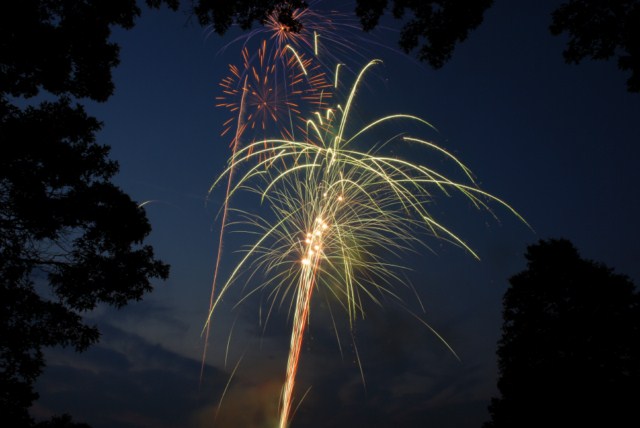
The image below is steadied by a tripod, 5 seconds, f16 at 100 ISO
Other Techniques
Set your camera to B and lock open your shutter – keep the lens covered with a dark hat and remove the hat to capture a burst then recover and repeat to capture several bursts. Just be careful not to bump your camera.
You can even zoom the lens during exposure for some interesting effects

Experiment and best of all have fun

Gallery images below shot mainly at 5 seconds, f16 at 100 ISO
Free Saturday Focus Sessions for July 2 – August 13

Focus sessions are free and take place in the Westwood store from 9:30 am – 10 am and our Englewood location from 10:30 am – 11:00 am. All sessions will allow for question and answers. Please bring your camera and any images along that you have questions about.

Here’s the schedule for July 2 – August 13, 2011

July 2 – Fireworks Photography

July 9 – Vacation Photography

July 16 – Get Steady – Monopods and Tripods

July 23 – Lenses – From wide and to telephoto – how to select and use.

July 30 – Getting better flash pictures

August 6 – Critique your photos – please bring two prints to discuss what you are doing right and get suggestions to improve

August 13 – Choosing the perfect camcorder

These are free events – bring a friend along if you’d like. Share with your friends on Facebook – Click the Like button below.

Canon Printer Demo Day – June 25

Location: Bergen County Camera – 270 Westwood Ave – Westwood, NJ 07675 – 201-664-4113

Join us between 10 am and 4 pm on Saturday June 25th for Canon Demo Day. Our Canon representative will be on hand to demo their Pixma PRO 9000 printers. Many Canon printers will be on special rebate through July 3, 2011. Full details and rebate information will be available during the demo.

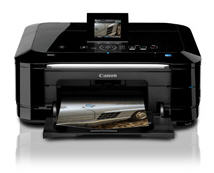
Canon Pixma MG8120

Pixma MG 8120

The PIXMA MG8120 possesses superior quality, functionality and versatility combined with beautiful design. The amazing feature set begins with an all-new interface that turns the top of your printer into a sleek, ultra-responsive touch panel. The Intelligent Touch System provides light-guided direction with gorgeous touch sensitive controls so only the buttons you need light up. Your fingers will realize fluid, effortless operation where once you choose your function you’re one step away from imaging brilliance.

For the first time in home photo printing you can print still photographs from your captured HD movies with your new PIXMA printer. Full HD Movie Print1 turns your favorite HD movie clips captured with compatible Canon EOS Digital SLR or PowerShot cameras into beautiful photo prints. Built-in Wi-Fi2 lets you easily print and scan wirelessly with the added ability to print your photos from compatible iPhone, iPod touch and Android™ devices3. Produce true photo lab quality prints at home with a maximum print resolution of 9600 x 2400 dpi4 and six individual ink tanks including a gray ink for professional color and black & white photos. Its superior 9600dpi5 high-resolution CCD scanner includes a Film Adapter Unit to easily scan 35mm film and slides. Plus, the White LED eliminates warm-up time for document and photo scanning while Auto Document Fix delivers beautiful, easy-to-view scans by advanced image analysis and area-by-area data correction, automatically.

Pixma MG6120

The PIXMA MG6120 delivers high performance, quality and true ease of use in one, sleek machine. It begins with a revolutionary interface that Canon has created where the top of your printer turns into a sleek, ultra-responsive touch panel. The Intelligent Touch System provides light-guided direction with gorgeous touch sensitive controls so only the buttons you need light up. Your fingers will realize fluid, effortless operation where once you choose your function you’re one step away from imaging brilliance.

For the first time in home photo printing your HD Movie moments can now become beautiful photos with your new PIXMA printer. Full HD Movie Print1 turns your favorite HD movie clips captured with compatible Canon EOS Digital SLR or PowerShot cameras into beautiful photo prints. Built-in Wi-Fi2 lets you easily print and scan wirelessly with the added ability to print your photos from compatible iPhone, iPod touch and Android™ devices3. Produce true photo lab quality prints at home with a maximum print resolution of
9600 x 2400 dpi4 and six individual ink tanks including a gray ink for professional color and black & white photos. Plus, Auto Document Fix delivers beautiful, easy-to-view scans by advanced image analysis and area-by-area data correction, automatically.

Adobe updates Adobe Camera Raw and Lightroom to 3.4.1

Adobe Labs has released minor update that fixes some minor issues uncovered after 3.4 / 6.4 was released. You can get this update by using the check for updates option in your Adobe software or by visiting the Adobe Labs Camera Raw page for this download. This page is the place to visit for the latest ACR release and beta test versions when available.

Sony Alpha DSLR School – June 28

Sony Alpha DSLR School Sony Logo

Transform your snapshots into photographs with this informative and inspiring class presented by Sony digital imaging experts. During this two hour course you’ll learn digital photography essentials, the basics of your Sony DSLR camera, how to shoot video with your DSLR and how to utilize compositional techniques that make a photograph memorable. Come take this first step to getting the most from your Sony DSLR investment.

Time: 7:00 – 9:00pm

Location: Bergen County Camera in Westwood, NJ

Tickets: $25

Register Now

Free Saturday Focus Sessions for May 21 – July 2

Focus sessions are free and take place in the Westwood store from 9:30 – 10 am and our Englewood location from 10:30 am – 11:00 am. All sessions will allow for question and answers. Please bring your camera and any images along that you have questions about.

Here’s the schedule for May 21 – July 2, 2011

May 21 – Sensor Cleaning How to – Learn what’s needed to clean your sensor. This is a great skill to have as dust always happens when your are least prepared!

May 28 – Get Steady – Monopods and Tripods

June 4 – How to photograph at the zoo – great preparation for our June 5 Bronx Zoo trip

June 11 – Longwood Gardens Trip – discussion, critique and suggestions for next steps

June 18 – Online Photofinishing – Books – Albums – Photo Mugs and more!

June 25 –

Westwood – Bronx Zoo trip discussion, critique and suggestions
Englewood Concert Photography

July 2 – Fireworks Photography

These are free events – be sure to bring a friend along if you’d like. Share with your friends on Facebook – Click the Like button below.

Adobe updates Camera Raw to 6.4 and Lightroom to 3.4

Adobe Labs has completed beta testing of Adobe Camera Raw (ACR) version 6.4 (adds support for several newer digital cameras). You can get this update by using the check for updates option in your Adobe software or by visiting the Adobe Labs Camera Raw page for this download. This page is the place to visit for the latest ACR release and beta test versions when available.

Camera support for Photoshop CS5 and Lightroom 3

Support for the following cameras has been added from Camera Raw 6.3 to 6.4 and Lightroom 3.3 to 3.4.

Hasselblad H4D-40
Kodak EasyShare Z990
Nikon D5100
Olympus E-PL1s
Olympus E-PL2
Olympus XZ-1
Samsung NX11
Canon EOS 600D (Rebel T3i / Kiss X5 Digital)
Canon EOS 1100D (Rebel T3 / Kiss X50 Digital)
Fuji FinePix S200 EXR
Fuji FinePix F550 EXR
Fuji FinePix HS20 EXR
Fuji FinePix X100

Lightroom 3.4 has just been released after completion of beta testing. In addition to adding support the cameras above it also addresses some minor issues uncovered in the previous versions of LR. You can get this update by checking for updates inside Lightroom.

The World of HD Video with EOS DSLR’s

Canon LogoCanon Discover DayCanon Digital Learning Center

In a brief period of time, HD video capability has exploded into the digital SLR world, adding impressive imaging capabilities to today’s Canon EOS SLR cameras.

Join Bergen County Camera at the Park Ridge Marriott on Wednesday, May 25, 2011 from 7 – 9 pm – tickets are $25 per person

If you are a first-time SLR user, or a long-time SLR enthusiast who has shot still images for years, and wonder how to really begin to use these new features to expand your image-making, Canon’s newest two-hour EOS Discovery Day class may be just what you’re looking for.

During this course you will:

  • Understand the foundation of video camera operations.
  • Discover how the video process works from pre-visualizing before shooting through editing and creating a finished product that’s ready for anything from the web to a high-definition DVD disk.
  • Learn the different camera settings and their impact of video such as frames per second, different resolution choices and even discuss optimum memory cards for video use.

Unlock your visual potential between you and your Canon EOS Camera with The World of HD Video with EOS digital SLRs. Attendees will receive at no extra cost a printed 77-page guide, covering the material we’ll discuss in this two-hour presentation.

Register Now

Free Saturday Focus Sessions for April and May

Focus sessions are free and take place in the Westwood store from 9:30 – 10 am and our Englewood location from 10:30 am – 11:00 am. All sessions will allow for question and answers. Please bring your camera and any images along that you have questions about.

Here’s the schedule for April and May

April 9 – Learn all about Micro 4/3s cameras then visit us for Olympus demo day in Westwood from 10 am – 4 pm

April 16 – Show us your Photos – Critique – please bring 2 – 3 images for an honest appraisal of your images and how to make them better. (printed photos only – no digital files please)

April 23 – Portraits with your Flash

April 30 – Landscape Photography

May 7 – Outdoor Sports Photography

May 14 – Photography at a Botanical Garden – a great preparation for our Longwood Gardens Trip on May 15

May 21 – Sensor Cleaning How to – Learn what’s needed to clean your sensor. This is a great skill to have as dust always happens when your are least prepared!

May 28 – Get Steady – Monopods and Tripods

These are free events – be sure to bring a friend along if you’d like.

Adobe Camera Raw 6.4 RC

Adobe Labs has just released Adobe Camera Raw version 6.4 RC (release candidate – the final step before production and one step past beta) to accommodate several newer digital cameras and lens profiles. This is an Adobe Labs beta product so there can be some issues but for someone who’s just purchased a new camera without current Adobe Camera Raw support, you may want to give it a try. Rest assured though a full tested version will be released soon. If you’d like to try the beta software visit the Adobe Labs Camera Raw page for this download. Please feel free to offer you feedback on this beta product by using the link from the Adobe Labs Camera Raw page listed above. ACR 6.4 RC was released on 10 March 2011.

  • Canon EOS 600D (Rebel T3i / Kiss X5)
  • Canon EOS 1100D (Rebel T3 / Kiss X50)
  • Hasselblad H4D-40
  • Olympus E-PL1s
  • Olympus E-PL2
  • Olympus XZ-1
  • Samsung NX11

Additional Lens Profiles added

Canon Canon EF 28-70mm f/2.8 L USM
Canon Canon EF 70-300mm f/4-5.6 L IS USM
Canon SIGMA 85mm F1.4 EX DG HSM**
Canon TAMRON 18-270mm F/3.5-6.3DiII VC PZD B008E
Leica Leica APO-MACRO-SUMMARIT-S 1:2.5/120mm
Leica Leica SUMMARIT-S 1:2.5/35mm ASPH
Leica Leica SUMMARIT-S 1:2.5/70 mm ASPH
Nikon Nikon AF-S DX NIKKOR 18-105mm f/3.5-5.6G ED VR
Nikon Nikon AF-S DX VR Zoom-NIKKOR 55-200mm f/4-5.6G IF-ED
Nikon Nikon AF-S Micro NIKKOR 60mm f/2.8G ED
Nikon Nikon AF-S NIKKOR 24-120mm f/4G ED VR
Nikon SIGMA 85mm F1.4 EX DG HSM
Nikon TAMRON 18-270mm F/3.5-6.3DiII VC PZD B008N