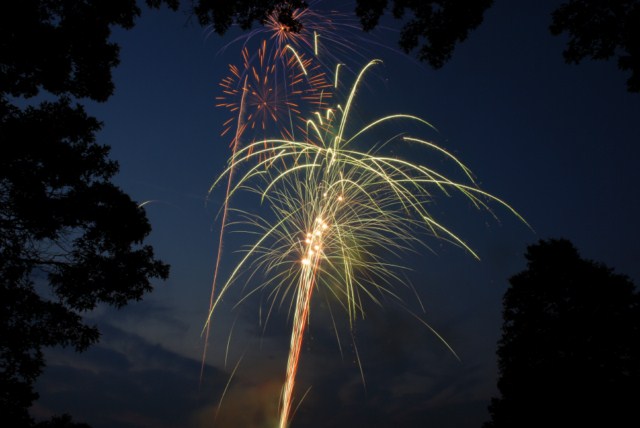
Where to Photograph Fireworks – Locations and Tips 2015

North Jersey’s parade, fireworks and celebration map

List of North Jersey fireworks, times and dates

Here are some basic starting points

Please let us know if you get some great shots we’d love to see!
Please feel free to leave your comments and suggestions. Have a great 4th of July Holiday weekend from all of us at BCC.

Find a fireworks display on NorthJersey.com‘s 4th of July celebrations page.

  • Use a tripod
  • Electronic release, 2 second self timer to eliminate shake or by carefully pressing the shutter button to minimize shake.
  • Manually set your camera ISO to 100 (You do not want Auto ISO)
  • Lens Choice – Wide Angle Zoom to frame what you’d like to capture
  • Auto White Balance or Daylight
  • Set your lens to manual focus then focus to infinity (take a test image and make sure things are sharp) Don’t forget to switch back to auto focus when done shooting
  • Method 1 – Set your camera to Manual exposure – Try 5 seconds at f/8 – 16 – this will allow you to capture several bursts
  • Method 2 – Try setting you camera to the “B” setting in manual – keep the shutter depressed at f/ 8 – 16 for several bursts
  • Carefully release the shutter if not using a release to capture from one to several bursts

**Evaluate your exposure – Shorter exposures (or smaller apertures ) will darken the image and capture shorter trails, Longer exposures (or larger apertures ) will lighten the image and capture longer trails.** If necessary make adjustments and take some more shots

If you are using a point a shoot, check your camera’s manual to see if you have a fireworks mode.

Improving Fireworks photos

Shoot with a tripod – it will give a more natural cascade of light.

Shooting the Finale!

The finale is many times brighter than rest of the show. Be ready to choose a shorter exposure or smaller aperture to prevent overexposure. The exposure you need is dependent on the number of simultaneous bursts. In some really incredible finales you may find yourself shooting at 1/4 or 1/8th of a second. Experiment for best results.

Why use a tripod?

Hand-held image above shows motion from camera shake in the burst of light.

The image below is steadied by a tripod, 5 seconds, f/16 at 100 ISO

Other Techniques

Set your camera to B and lock open your shutter – keep the lens covered with a dark hat and remove the hat to capture a burst then recover and repeat to capture several bursts. Just be careful not to bump your camera.
You can even zoom the lens during exposure for some interesting effects

Experiment and best of all have fun.

Happy Independence Day.

Prepare Your Camera For Summer

summerban

With the welcome return of summer comes vacations, beaches, pools, and campfires. We know you’re ready, but is your camera? All too often we hear the dreaded stories of past vacations where a camera suddenly stops working. Avoid the disappointment by following this camera checklist:

1. Turn your camera on – It’s a simple step, but sometimes it reveals a serious issue.

  • If your camera turns on – Great! Step one passed.
  • If your camera does not turn on – Don’t panic. Try charging you battery. Camera batteries can go dead after months of sitting on a shelf. If your camera still does not turn on after charging your battery, bring your camera in and we’ll figure out what’s wrong. Your battery could have stopped holding a charge, or it could be something worse. We’re here to help!

2. Spend some time taking sporadic photos throughout your day – Make sure you use your flash for a few photos.

  • If your camera takes photos – Great! Step two passed.
  • If your camera takes photos but the battery dies quickly – Often camera batteries will stop holding a charge or hold less of a charge after a few years of use. If your battery life diminishes quickly it’s time for a replacement battery.
  • The camera won’t take photos or has given an error screen – Try a different memory card. It could be a bad memory card causing the problem. If it’s still not taking photos, bring the camera in. It could be a quick fix, it could be worse. Either way, we’re here to help!
  • The flash isn’t working – Check which mode your camera currently is in. In Auto mode your camera will automatically raise and fire your flash. In Program on more manual modes, you must tell the camera to use the flash. Check which mode your camera is currently in. If it’s still having issues, bring it in. Could be something simple, could need to be fixed. We’ll figure it out for you.

3. Download your photos to your computer –

  • Everything downloaded quickly and looks correct – Great! You’ve got a working camera and memory card. We still recommend taking an extra battery and memory card with you this summer, because it’s always better to be safe then to miss an important moment.
  • It’s been downloading for hours, does it usually take this long? – No, sometimes your memory cards have corruption issues and sometimes your memory card readers stop working right. Bring in the memory card and we’ll figure out which is not working. You can try formatting the card, but this will lose the photos currently saved on your memory card. Better losing those meaningless photos then important once in a lifetime photos.
  • The computer gave me a corruption message – You can try formatting your memory card, this will delete all the photos currently on your memory card. You may need a new memory card. Remember all Promaster memory cards and rechargeable lithium ion camera batteries have lifetime guarantees.

Recommended summer vacation accessories:

  • Optech Rain Sleeves – Now available in several different sizes, these plastic sleeves will allow you to take photos safely in the rain. Also great for protection from sand damage. Place your camera in the sleeve and take those great beach photos without having to worry about wind blown sand ending up inside your camera.
  • Polarized lens filter – Great vacation spots always include some form of water and polarizers make a huge difference when photographing water.
  • Back Up Promaster Battery – Keep taking photos with a back up battery. All Promaster batteries come with a lifetime guarantee.
  • Back Up Promaster SD Card – Take more photos and don’t worry about corruption. Have multiple memory cards to save your photos to.
  • Comfortable Camera Bag – The more comfortable you can make having your camera with you, the less likely you’ll be to leave it behind.
  • Comfortable Neck Strap – Walking around with a camera on your neck can be irritating. Purchasing a comfortable neck strap or shoulder strap for your camera can change your photo experience.

Still not feeling confident with your camera or think there is an issue? Visit Bergen County Camera and we’ll check your camera and lenses, and give you recommendations for what accessories you’ll need for your vacation.


Free Focus Sessions – July and August 2015

Focus sessions are free and take place in our store from 9:30 am – 10 am. All sessions will allow for questions and answers. Please bring your camera and any images along that you have questions about. Feel free to use the comment option to make suggestions for future focus sessions.

focusbanner1Hit the “Like Button” to let your friends know. Have suggestions for future focus sessions? Feel free to leave a comment.


Here’s our upcoming Focus Sessions:

July 4 – No Focus Session – Bergen County Camera Closed

July 11 – Wildlife Photography

July 18 – Sensor Cleaning

July 25 –  When Things Go Wrong

August 1 – Infrared Photography – See what it can do for you – presenter Alan Schwab

August 8 – Mylio with Special Guest Harry Wendt

These are free events – bring a friend along if you’d like. Share with your friends on Facebook – Click the Like button below. Hope you can join us!

"fo</p

Nikon Demo Day This Saturday

Join us this Saturday for a Nikon Demo Day. Nikon representatives will be in the store from 10 AM until 4 PM to answer all of your questions on Nikon cameras and lenses. Want to learn even more about your Nikon cameras? Sign up for the Nikon Beginner Class on July 14th and the Nikon Intermediate classes on July 15th held here at Bergen County Camera from 7 PM – 9 PM.

Father’s Day Photo Night Presented By Canon

fdbanBring the family in to Bergen County Camera on Thursday, June 18th from 6:00 PM until 8:00 PM for a night filled with fun and photography. While Mom or Dad learns how to use a Canon DSLR, the kids will get to design a custom photo mat. Mom or Dad can take a photo of their kids in our in-store studio and we’ll print a free 8×10 on a Canon Pixma Pro Printer. We’ll then mat the photo with the custom mat designed by your children for a great photo present for Father’s Day. Pizza and chicken nuggets will be served. Plus, we’ll have incredible deals on Canon printers available that night only!
Eventbrite - Father's Day Photo Night Presented by Canon

Upcoming Classes

Classes

June 23rd – Basic Digital Photography

Join Bergen County Camera’s John Tworsky and Paul Carretta for a 2 hour introduction to Digital Photography. This class is designed to provide the basics of digital photography regardless of the type of digital camera you are using or even if you are looking to buy your first. Topics to be covered include basic camera operation, batteries, storage media, card readers, choosing a resolution, compression, limitations and advantages of digital photography, making prints & enlargements, and storing & archiving images. Of course there will be plenty of time for questions at the end of the presentation. You’ll also receive a list of assignments to test your knowledge.

Join BCC’s John Tworsky for a two-hour class introducing Adobe Photoshop. This course is for first time and beginner Photoshop CS & Photoshop Elements users and will cover computer & program requirements, acquiring images, image formats, storage considerations and a basic overview of the capabilities of Photoshop. Examples include opening images, rotating, preparing images for email, preparing images for printing, image adjustments (brightness, contrast & color), fixing crooked images & scans and printing multiple images on a single sheet of paper. Although this class is presented on a PC, most if not all information will carry over to use on Macintosh.

Eventbrite - Bergen County Camera Classes

June 24th – Intermediate Digital Photography

Join BCC’s John Tworsky and Paul Carretta for a 2 hour continuation of Basic Digital Photography. This class is designed to provide the next step in your digital photography learning. Topics to be covered include exposure (f-stops, shutter speeds, ISO), using shutter speeds to control motion, using f-stops to control depth of field, and ISO to control sensor sensitivity. We’ll talk about composition, tripods, monopods, self timers, keeping your images safe and more. Suggested Pre-requisite: Basic Digital Photography. Of course there will be plenty of time for questions at the end of the presentation. Course handouts include test your knowledge assignments, basic class reminders, special offers, computer tips and helpful programs. No money is needed in parking meters in Westwood after 6PM.

Eventbrite - Bergen County Camera Classes

July 7th – Advanced Digital Photography

Join BCC’s John Tworsky and Paul Carretta for a 2 hour continuation of Intermediate Digital Photography. This class is designed to provide the next step in your digital photography learning. Topics to be covered include advanced camera operation; setting white balance, raw file format and when to use, time exposures and flash. Additional photographic topics to be discussed include flash photography, composition, metering with a grey card, converging verticals and more. Suggested Pre-requisite: An adjustable camera or DSLR and our Intermedaite Digital Photography class. Of course there will be plenty of time for questions at the end of the presentation. Course handouts include test your knowledge assignments, Basic and Intermediate class reminders, special offers, computer tips and helpful programs. No money is needed in parking meters in Westwood after 6PM.

Eventbrite - Bergen County Camera Classes

July 14th – Nikon Basic

The very basics of Auto mode, followed by how to get out of auto mode.This class focuses largely on scene modes and camera controls for exposure, white balance and focus. Composition and tips on improving photos are the main, non-technical areas that the class covers. This class is good for absolutely anyone with a camera, especially beginners and new DSLR owners. Join Bergen County Camera on Tuesday, July 14th from 7:00 – 9:00 pm. Tickets are $25 per person.

Eventbrite - Nikon Seminar - Basic

July 15th – Nikon Intermediate

This is an intermediate to advanced level DSLR class that covers many of the topics that one might explore after learning the basics of camera terminology and exposure. Topics covered include flash photography, custom settings, lenses, autofocus settings, metering and more. Join Bergen County Camera on Wednesday, July 15th from 7:00 – 9:00 pm. Tickets are $25 per person.

Eventbrite - Nikon Seminar - Intermediate


July 22nd – Photographing Children

Special guest, photographer Shelly Kusnetz, joins us on July 22nd from 7 PM until 9 PM to teach her great techniques of how to photograph children and capture the true essence of your child. With tips on the technical aspects and the personal approach. Tickets are $50.00.

Learn more about Shelly on her website.

Eventbrite - Bergen County Camera Classes

July 28th – Basic Digital Photography

Join Bergen County Camera’s John Tworsky and Paul Carretta for a 2 hour introduction to Digital Photography. This class is designed to provide the basics of digital photography regardless of the type of digital camera you are using or even if you are looking to buy your first. Topics to be covered include basic camera operation, batteries, storage media, card readers, choosing a resolution, compression, limitations and advantages of digital photography, making prints & enlargements, and storing & archiving images. Of course there will be plenty of time for questions at the end of the presentation. You’ll also receive a list of assignments to test your knowledge.

Join BCC’s John Tworsky for a two-hour class introducing Adobe Photoshop. This course is for first time and beginner Photoshop CS & Photoshop Elements users and will cover computer & program requirements, acquiring images, image formats, storage considerations and a basic overview of the capabilities of Photoshop. Examples include opening images, rotating, preparing images for email, preparing images for printing, image adjustments (brightness, contrast & color), fixing crooked images & scans and printing multiple images on a single sheet of paper. Although this class is presented on a PC, most if not all information will carry over to use on Macintosh.

Eventbrite - Bergen County Camera Classes

July 29th – Intermediate Digital Photography

Join BCC’s John Tworsky and Paul Carretta for a 2 hour continuation of Basic Digital Photography. This class is designed to provide the next step in your digital photography learning. Topics to be covered include exposure (f-stops, shutter speeds, ISO), using shutter speeds to control motion, using f-stops to control depth of field, and ISO to control sensor sensitivity. We’ll talk about composition, tripods, monopods, self timers, keeping your images safe and more. Suggested Pre-requisite: Basic Digital Photography. Of course there will be plenty of time for questions at the end of the presentation. Course handouts include test your knowledge assignments, basic class reminders, special offers, computer tips and helpful programs. No money is needed in parking meters in Westwood after 6PM.

Eventbrite - Bergen County Camera Classes

Long Exposure Photography

Long Exposures

1024px-Boulevard_du_Temple_by_Daguerre
“Boulevard du Temple”, a daguerreotype made by Louis Daguerre in 1838. The first known photograph of a human.

The first cameras ever made would only shoot long exposure photographs. These cameras could only capture low levels of light over a prolonged amount of time. The first known photograph of a person “Boulevard du Temple” was taken by coincidence in 1838. A gentleman just happened to get his shoes shined while the photograph was being taken. This anonymous figure stood just still enough for just long enough to appear in the final image.

Long exposure photography involved forcing your camera to shoot images at slower then needed shutter speeds in order to create a motion effect. Long exposure photographs can produce smooth or milky water, light trails, and moving object disappearing from the final image.

Depending on when you are taking your long exposure photograph, you will need the following items:

  • A Camera with manual setting
  • Tripod
  • Neutral Density Filter (during the day)
  • A remote release (Either wired or wireless)

There are a few ways to slow down your shutter speed without overexposing your photograph. You can lower your ISO, close down your aperture (f/8-f22), or use neutral density filters. Due to the shutter speed being slow, a tripod is needed to prevent motion blur on your subject.

1397311_577383000577_177590289_o
An example of a long exposure photograph taken during the day using a neutral density filter.

To take a long exposure photograph, place your camera into aperture priority or manual mode. In aperture priority your camera will choose a proper shutter speed based upon what you set the aperture and ISO to in your camera. If you set your ISO to 100 and raise the aperture to close down the lens (f/18 or f/22) your camera will be forced to take a photo at a slower shutter speed. The same effect can be created by manually setting the ISO, aperture, and shutter speed but you will be forced to meter your image instead of the camera.

When photographing water during the day, place your camera on a tripod and use a neutral density filter. Neutral density filters will allow less light to pass through your lens. There are several different levels of neutral density filters each blocking more amount then the previous. ( 4x, 8x, 16x, 32x, 400x, 1000x) Variable Neutral Density filters also are available. These allow the photographer to select how much light to let through.

10644103_610064311967_7570970746639168978_o
A night time long exposure shot without a neutral density filter.

When shooting Long Exposure photographs at night, the neutral density filter is often not needed. The camera can be placed upon a tripod and shot using whatever light is available. However, on nights when the moon is full or when you’re near other light sources the desired effect cannot be accomplished. In those situations a Neutral Density Filter can be used.

The effects accomplished by shooting long exposure photographs in the right places can be amazing. Recently a photographer named Christopher Thomas shot long exposure photographs of New York city which make the city look abandoned.  Michael Massaia, one of the artists represented by Gallery 270, has created several absolutely stunning photographs, including several photos in his “Afterlife portfolio, using long exposure techniques.

To learn more about long exposure photography stop into Bergen County Camera, comment below, or send us a message on Facebook. We’re here to help!

Visit Bergen County Camera this Thursday night, April 30th, between 6 PM and 9 PM to save 20% on all Promaster Camera batteries and filters. (including Neutral Density filters!)

Places to Photograph: New Croton Dam, Croton-on-Hudson, NY

Crotondambanner

View a full list of great local photo locations.

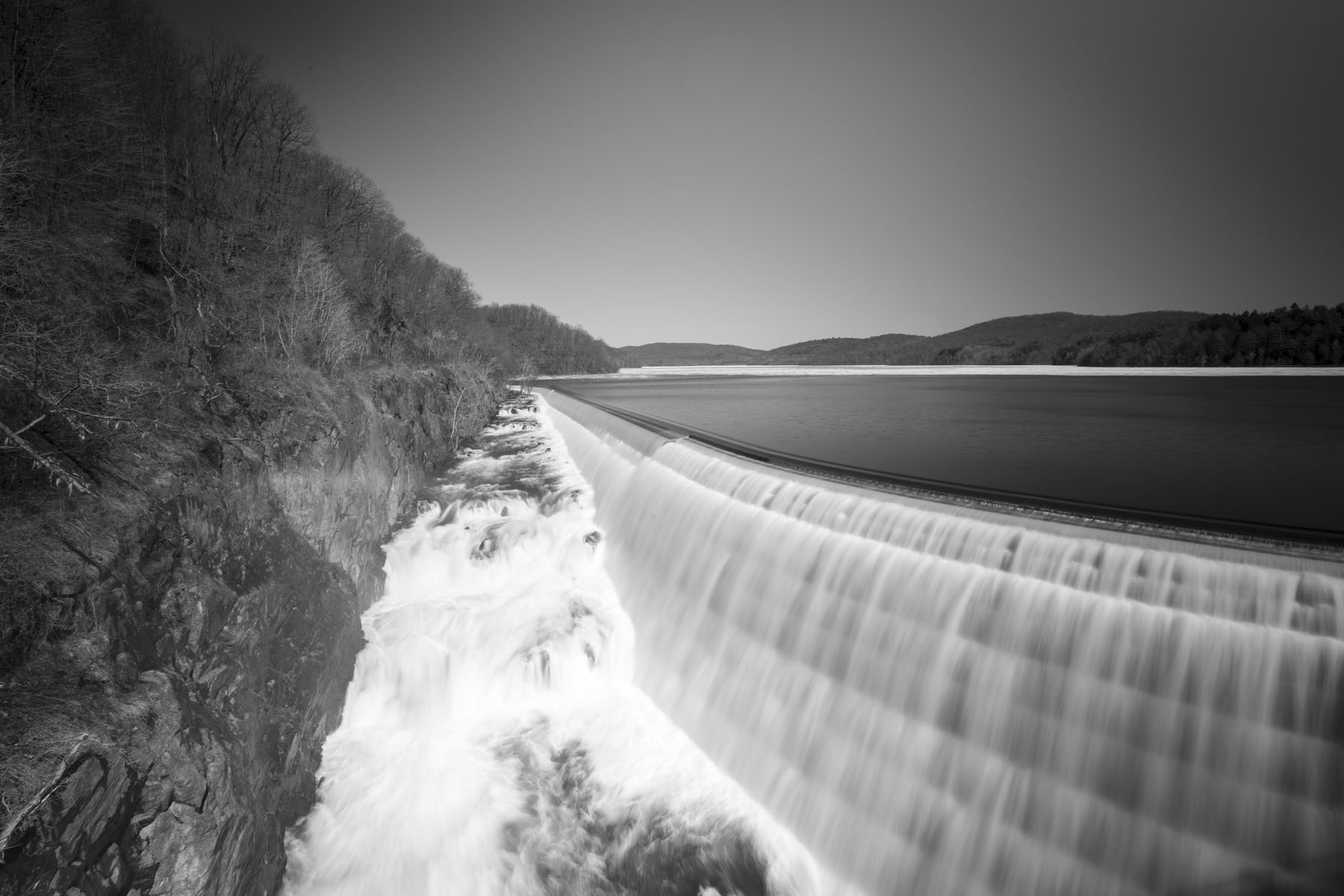
The New Croton Dam (also known as Cornell Dam), part of the New York City water supply system, stretches across the Croton River near Croton-on-Hudson, New York. Located about 50 minutes from our store, Croton Dam makes a great day trip or picnic destination . Construction began in 1892 and was completed in 1906. The masonry dam is 266 feet  broad at its base and 297 feet high from base to crest. At the time of its completion, it was the tallest dam in the world. New Croton Dam impounds up to 19 billion gallons of water. The dam has an unusual spillway, part artificial and part natural, which forms a waterfall on the north side of the structure.

Photos by: Alfred Hess

Lytro Photo Walk – April 18th

lytrowalkbanReserve your camera now for our Free Lytro Photo Walk on April 18th at 11:00 AM. Lytro representatives will be in the store to explain how to use the camera, then take a demo camera around Westwood with you to create Living Pictures yourself. Lytro cameras are light field cameras which enable you to adjust the location of focus, depth of focus, and even shift the perspective.

Eventbrite - Lytro Photo Walk - April 18th

Free Focus Sessions – April 2015

Focus sessions are free and take place in our store from 9:30 am – 10 am. All sessions will allow for questions and answers. Please bring your camera and any images along that you have questions about. Feel free to use the comment option to make suggestions for future focus sessions.

_BBC1086 (Copy)

Hit the “Like Button” to let your friends know. Have suggestions for future focus sessions? Feel free to leave a comment.

_BBC1099 (Copy)

Here’s our upcoming Focus Sessions:

March 28 – Spring is Here!

April 4 – How to Clean Your Camera’s Sensor

April 11 – Transfer and Print Your Phone Photos

April 18 – Spring Sale Early Bird Specials

April 25 – Street Photography

These are free events – bring a friend along if you’d like. Share with your friends on Facebook – Click the Like button below. Hope you can join us!

_BBC1095 (Copy)

_BBC1108 (Copy)