Adobe Camera Raw 6.6 RC

Adobe Labs has just released Adobe Camera Raw version 6.6 RC (release candidate – the final step before production and one step past beta) to accommodate several newer digital cameras and lens profiles. This is an Adobe Labs beta product so there can be some issues but for someone who’s just purchased a new camera without current Adobe Camera Raw support, you may want to give it a try. Rest assured though a full tested version will be released soon. If you’d like to try the beta software visit the Adobe Labs Camera Raw page for this download. Please feel free to offer you feedback on this beta product by using the link from the Adobe Labs Camera Raw page listed above. ACR 6.6 RC was recently released and will expire in January 2012 when the official version in released.

  • Canon PowerShot S100
  • Nikon 1 J1
  • Nikon 1 V1
  • Panasonic Lumix DMC-GX1
  • Samsung NX5

Additional Lens Profiles added

Lens Mount Lens Name
Canon Sigma 12-24mm F4.5-5.6 DG HSM II
Canon Sigma 18-200mm F3.5-6.3 DC OS HSM II
Canon Sigma 105mm F2.8 EX DG OS HSM Macro
Canon Sigma 150mm F2.8 EX DG OS HSM APO Macro
Nikon Nikon 1 NIKKOR 10mm f/2.8
Nikon Nikon 1 NIKKOR VR 10-30mm f/3.5-5.6
Nikon Nikon AF-S DX Micro-NIKKOR 40mm f/2.8G
Nikon Sigma 12-24mm F4.5-5.6 DG HSM II
Nikon Sigma 105mm F2.8 EX DG OS HSM Macro
Nikon Sigma 150mm F2.8 EX DG OS HSM APO Macro
Phase One Mamiya AF 35mm f/3.5
Phase One Mamiya AF 45mm f/2.8
Phase One Mamiya Sekor AF 28mm f/4.5 D Aspherical
Phase One Mamiya Sekor AF 55mm f/2.8 LS D
Phase One Mamiya Sekor AF 80mm f/2.8 D
Phase One Mamiya Sekor AF 80mm f/2.8 LS D
Phase One Mamiya Sekor AF 110mm f/2.8 LS D
Phase One Mamiya Sekor AF 150mm f/3.5 LS
Phase One Phase One 28 mm Digital AF f/4.5 Aspherical
Phase One Phase One 35 mm Digital AF f/3.5
Phase One Phase One 45 mm Digital AF f/2.8
Phase One Phase One 80 mm Digital AF f/2.8
Phase One Schneider-Kreuznach 55 mm LS f/2.8
Phase One Schneider-Kreuznach 110 mm LS f/2.8
Phase One Schneider-Kreuznach 150 mm LS f/3.5
Sigma Sigma 12-24mm F4.5-5.6 DG HSM II
Sigma Sigma 120-300mm F2.8 EX DG OS APO HSM
Sigma Sigma 105mm F2.8 EX DG OS HSM Macro
Sigma Sigma 150mm F2.8 EX DG OS HSM APO Macro
Sigma Sigma DP2x
Sony Sigma 50-200mm F4-5.6 DC OS HSM

Thanksgiving Card Photo Contest

Bergen County Camera’s Thanksgiving Card
Photo Contest offers $3,000 in prizes – October 19

Bergen County Camera's Thanksgiving Card Photo Contest Acadia National Park Fall Foliage

Deadline for entries: Tuesday, October 18     Looking for our Fall Foliage Tips & State Websites?

Print an Entry Form or pick one up in store  Vist Bergen County Camera on Facebook Like Us

Enter your favorite photo that in some way reinforces the gratitude, the change or seasons, or a notable moment. It may be a Fall or harvest landscape, a seasonal celebration, a special family moment, or perhaps something humorous yet engaging.

The entry selected will win a $3.000 Gallery 270 “Portfolio 2” – A collection of 6 stunning, limited edition photographs. The winning image will be featured in Bergen County Camera’s Thanksgiving Card. See a store employee for complete details.

We’re requesting an entry fee of $10 per image ($5 per image for students.) The full entry fee will be donated to Table to Table, which successfully and tirelessly fights hunger in our region.

Table to Table Logo

Contest Details

Photos may be submitted in-store only. Deadline for submissions is October 18, 2011. All formats welcomed. Submissions must be accompanied by a 5×7 print for judging.

Adobe updates Camera Raw to v6.5

Adobe Labs has completed beta testing of Adobe Camera Raw (ACR) version 6.5 (adds support for several newer digital cameras). You can get this update by using the check for updates option in your Adobe software or by visiting the Adobe Labs Camera Raw page for this download. This page is the place to visit for the latest ACR release and beta test versions when available.

Camera support for Photoshop CS5 and Lightroom 3

Support for the following cameras has been added from Camera Raw 6.4 to 6.5 and Lightroom 3.4 to 3.5.

  • Fuji FinePix F600EXR
  • Hasselblad H4D-60
  • Leaf Aptus II 12
  • Leaf Aptus II 12R
  • Nikon Coolpix P7100
  • Olympus E-P3
  • Olympus E-PL3
  • Olympus E-PM1
  • Panasonic DMC-FZ150
  • Panasonic DMC-G3
  • Panasonic DMC-GF3
  • Pentax Q
  • Phase One IQ140
  • Phase One IQ160
  • Phase One IQ180
  • Phase One P40+
  • Phase One P65+
  • Ricoh GXR MOUNT A12
  • Sony Alpha NEX-C3
  • Sony Alpha NEX-5N
  • Sony SLT-A35
  • Sony SLT-A65
  • Sony SLT-A77

Lightroom 3.5 has just been released after completion of beta testing. In addition to adding support the cameras above it also addresses some minor issues uncovered in the previous versions of LR. You can get this update by checking for updates inside Lightroom.

Tips for fall foliage photos, and state foliage websites

Acadia National Park Fall Foliage

Acadia National Park – Maine
Got a great image to share? Enter it in our Thanksgiving Card photo contest.

Foliage Photography:
Tips for great pictures

Filters

A polarizing filter is really the only “must have” filter to bring along for great digital fall foliage pictures. A polarizer creates dramatic fall foliage pictures by darkening the sky, increasing contrast and deepening colors and removing the sheen from the leaves. Most other filter effects such as enhancing reds and oranges, sepia and graduated effects can be easily created in Photoshop. Your standard protective UV filter should be removed before putting your polarizer on – never stack filters. Also, don’t forget to remove your polarizer when you move back inside, as it reduces light by one to two f-stops.

A second type of filter is an enhancing filter which does just what the name implies – enhances. This filter is especially effective with the bright primary colors of autumn (reds, oranges and browns). A third filter is a Color / Neutral Graduated filter which utilizes a color (or gray) that gradually diminishes from dark to light across the filter. These filters are often used to deepen the sky or to balance the exposure between foreground and background, which helps you keep the sky blue rather than washed out.

Tips

  • Nothing takes away from foliage more than a bright white overcast sky. In these situations, try to reduce the amount of sky in your images.
  • Dramatic storm clouds of autumn thunderstorms interspersed with blue sky make a stunning backdrop for the brilliant colors of fall, especially when the vivid colors are brought out with a polarizer filter.
  • Use a tripod for the sharpest possible image. This will allow an ISO of 100 or 200. Remember to use a remote release or self timer to prevent motion when pressing the shutter.
  • Colors are warmer and can be more dramatic closer to sunrise and sunset. The hour before and after sunrise and sunset are considered by many to be the “magic hours” where you get an amazing quality of light.
  • Experiment, take lots of pictures and above all have fun!
  • Since you are shooting more with your digital camera, be sure to edit out some images before showing off your work to family and friends
Once you’ve assembled your camera and a few filters, all you’ll need is foliage at the peak of color. We’ve assembled a list of state hotlines below to help schedule your trip. Need some ideas for places to shoot, be sure to visit Bergen County Camera’s Where to take great Pictures page. Have some suggestions of your own? Please send us an email and we’ll include your suggestions.

Fall foliage websites and hotlines

The Foliage Network

New Jersey 
mid to late October 
Connecticut
 Late September - mid October 
Maine 
Early September - mid October
Massachusetts
October 
New Hampshire 
Late September - mid October
New York
Late September - late October
Pennsylvania 
Early October
Vermont 
Early September - Late October
Virginia 
September - Late November
Delaware 
Late October
Maryland 
Late September - Late October
Rhode Island 
Late September - mid October

Remember to visit Bergen County Camera in Englewood or Westwood, NJ for filters, tripods, lenses, cameras and prints.

Free Saturday Focus Sessions – October and November

Focus sessions are free and take place in the Westwood store from 9:30 am – 10 am and our Englewood location from 10:30 am – 11:00 am. All sessions will allow for questions and answers. Please bring your camera and any images along that you have questions about.

Here’s the schedule for October and November

October 1 – Millbrook Winery Trip Review

October 8 – Show us your Photos – Please bring no more than 2 prints for review

October 15 – Outdoor Sports Photography

October 22 – What’s in Your Camera Bag or Should Be

October 29 – Halloween Photos

November 5 – How to Shoot a Great Holiday Card Photo

November 12 – Getting Better Flash Photos

November 19 – How to Shoot Great Party Photos

November 26 – Thanksgiving Weekend – No Focus Session in Either Location

These are free events – bring a friend along if you’d like. Share with your friends on Facebook – Click the Like button below. Hope you can join us!

Gallery 270 at Bergen County Camera artist inteview on WPIX

Gallery 270 at Bergen County Camera artist Michael Massaia was interviewed on the WPIX Morning news on September 22. The interview is a great look at Michael’s unique printing style which will be on display at the expo. Michael will be in the Gallery section of the NJ Photo Expo this Sunday at the Park Ridge Marriott. Free tickets are still available.

Michael Massaia interview on WPIX

Hope to see you at the Expo!

NJ Photo Expo announces speaker sessions

Bergen county Camera's NJ Photo Expo

Speaker sessions have just been announced for this years NJ Photo Expo. This years sessions are $10 each and include Ron Magill, Jack Reznicki, Elliott Landy, David H. Wells and Cliff Mautner. In addition to all the great specials, there will be a redesigned model photographing and macro photography with ample room for you to take photographs. We’ll also have several Gallery 270 artists on hand to talk about their photography.

Full details and tickets on the NJ Photo Expo website. Hope you can join us.

Expo tickets are Free – Speaker sessions are just $10 each.

Fireworks Photography Tips – July 2011

Where to photograph fireworks
Bergen Record guide to Independence Day Celebrations

Star Ledger guide to Independence Day Celebrations

Here are some basic starting points

If you have any questions, stop by the store, email or call. We’re here to help. Please let us know if you get some great shots we’d love to see!
Please feel free to leave your comments and suggestions. Have a great 4th of July Holiday weekend from all of us at BCC.

Find a fireworks display on NJ.com’s July 4th events page

Tripod
Electronic release (available for most cameras at BCC) or 2 second self timer to eliminate the motion caused by pressing the shutter button.
Manually set your camera ISO to 100 (You do not want Auto ISO)
Lens Choice – Wide Angle Zoom to frame what you’d like to capture
Auto White Balance or Daylight
Set your lens to manual focus then focus to infinity (take a test image and make sure things are sharp)
Set your camera to Manual exposure – Try 5 seconds at f/ 16
Carefully release the shutter if not using a release to capture from one to several bursts
Evaluate your exposure – Shorter exposures (or smaller apertures ) will darken the image and capture shorter trails, Longer exposures (or larger apertures ) will lighten the image and capture longer trails.
Evaluate sharpness by zooming in on your image – adjust as needed

If you are using a point a shoot, check your camera’s manual for fireworks mode.

Improving Fireworks photos
Shoot with a tripod – it will give a more natural cascade of light

Shooting the Finale!
The finale is many times brighter than rest of the show. Be ready to choose a shorter exposure or smaller aperture to prevent overexposure. The exposure you need is dependent on the number of simultaneous bursts. In some really incredible finales I’ve found myself shooting at 1/4 or 1/8th of a second. Experiment for best results.

Why use a tripod?

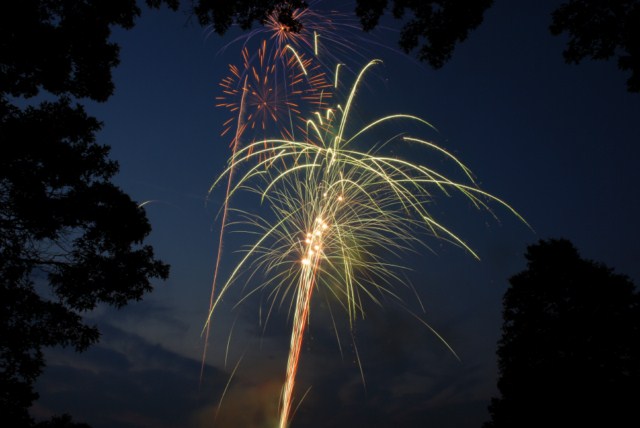
Hand-held image above shows motion from camera shake in the burst of light.

The image below is steadied by a tripod, 5 seconds, f16 at 100 ISO

Other Techniques
Set your camera to B and lock open your shutter – keep the lens covered with a dark hat and remove the hat to capture a burst then recover and repeat to capture several bursts. Just be careful not to bump your camera.
You can even zoom the lens during exposure for some interesting effects

Experiment and best of all have fun

Gallery images below shot mainly at 5 seconds, f16 at 100 ISO

Free Saturday Focus Sessions for July 2 – August 13

Focus sessions are free and take place in the Westwood store from 9:30 am – 10 am and our Englewood location from 10:30 am – 11:00 am. All sessions will allow for question and answers. Please bring your camera and any images along that you have questions about.

Here’s the schedule for July 2 – August 13, 2011

July 2 – Fireworks Photography

July 9 – Vacation Photography

July 16 – Get Steady – Monopods and Tripods

July 23 – Lenses – From wide and to telephoto – how to select and use.

July 30 – Getting better flash pictures

August 6 – Critique your photos – please bring two prints to discuss what you are doing right and get suggestions to improve

August 13 – Choosing the perfect camcorder

These are free events – bring a friend along if you’d like. Share with your friends on Facebook – Click the Like button below.

Canon Printer Demo Day – June 25

Location: Bergen County Camera – 270 Westwood Ave – Westwood, NJ 07675 – 201-664-4113

Join us between 10 am and 4 pm on Saturday June 25th for Canon Demo Day. Our Canon representative will be on hand to demo their Pixma PRO 9000 printers. Many Canon printers will be on special rebate through July 3, 2011. Full details and rebate information will be available during the demo.

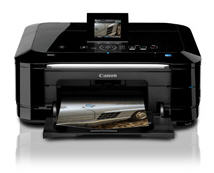
Canon Pixma MG8120

Pixma MG 8120

The PIXMA MG8120 possesses superior quality, functionality and versatility combined with beautiful design. The amazing feature set begins with an all-new interface that turns the top of your printer into a sleek, ultra-responsive touch panel. The Intelligent Touch System provides light-guided direction with gorgeous touch sensitive controls so only the buttons you need light up. Your fingers will realize fluid, effortless operation where once you choose your function you’re one step away from imaging brilliance.

For the first time in home photo printing you can print still photographs from your captured HD movies with your new PIXMA printer. Full HD Movie Print1 turns your favorite HD movie clips captured with compatible Canon EOS Digital SLR or PowerShot cameras into beautiful photo prints. Built-in Wi-Fi2 lets you easily print and scan wirelessly with the added ability to print your photos from compatible iPhone, iPod touch and Android™ devices3. Produce true photo lab quality prints at home with a maximum print resolution of 9600 x 2400 dpi4 and six individual ink tanks including a gray ink for professional color and black & white photos. Its superior 9600dpi5 high-resolution CCD scanner includes a Film Adapter Unit to easily scan 35mm film and slides. Plus, the White LED eliminates warm-up time for document and photo scanning while Auto Document Fix delivers beautiful, easy-to-view scans by advanced image analysis and area-by-area data correction, automatically.

Pixma MG6120

The PIXMA MG6120 delivers high performance, quality and true ease of use in one, sleek machine. It begins with a revolutionary interface that Canon has created where the top of your printer turns into a sleek, ultra-responsive touch panel. The Intelligent Touch System provides light-guided direction with gorgeous touch sensitive controls so only the buttons you need light up. Your fingers will realize fluid, effortless operation where once you choose your function you’re one step away from imaging brilliance.

For the first time in home photo printing your HD Movie moments can now become beautiful photos with your new PIXMA printer. Full HD Movie Print1 turns your favorite HD movie clips captured with compatible Canon EOS Digital SLR or PowerShot cameras into beautiful photo prints. Built-in Wi-Fi2 lets you easily print and scan wirelessly with the added ability to print your photos from compatible iPhone, iPod touch and Android™ devices3. Produce true photo lab quality prints at home with a maximum print resolution of
9600 x 2400 dpi4 and six individual ink tanks including a gray ink for professional color and black & white photos. Plus, Auto Document Fix delivers beautiful, easy-to-view scans by advanced image analysis and area-by-area data correction, automatically.