Here are the winners from the Parkside Orchid Photo Trip Contest:
Third Place – Photo by Vivian Lee

Second Place – Photo by Bob Beacham

First Place – Photo by Bob Beacham

Congratulations to Bob Beacham and Vivian Lee!
Bergen County Camera news, events, products, helpful photographic tips and suggestions
Here are the winners from the Parkside Orchid Photo Trip Contest:
Third Place – Photo by Vivian Lee
Second Place – Photo by Bob Beacham
First Place – Photo by Bob Beacham
Congratulations to Bob Beacham and Vivian Lee!
Everything in photography is about light. Many people complain about blurry images and the amount of available light has everything to do with it. If you can get away with using a flash, that’s a sure-fire way to get the job done. Keep in mind that most point and shoot cameras have a flash that will only reach to about 13 feet. If you’re using an SLR, the camera’s built in flash will give you a very similar light output. If you can afford it, it would be wise to invest in an accessory flash unit. A high-end flash can give you up to 80 feet of distance and will cost you around $500. In addition to drastically reducing blur, an accessory flash unit will also help in reducing red-eye.
Another thing that can help you is image stabilization – but there’s a catch. Image stabilization (or vibration reduction or steady shot or vibration control… it’s all the same) will help control blurry images caused by camera shake. If your subject is moving they’re still going to end up blurry. If you’re getting camera shake and you don’t have image stabilization, hold the camera with both hands while holding your arms against yourself – essentially forming a tripod. It’s not a 100% solution, but it should help.
Some small digital cameras have something called “E.I.S.” or “Electronic Image Stabilization”. EIS essentially raises the camera’s ISO (or light sensitivity) in order to capture a less blurry image. In doing this, it is also lowering your image quality and creating a lot of noise, or grain, within the image. I would only recommend doing this if it’s completely necessary.
The only absolute solution for blurry images is to increase the amount of available light, though of course in many situations this is not possible. Get creative if needed – then you’ll get the best results.


We now have a Nikon D70 which has been converted for infrared photography available for rent.
Give us a call or stop by the Westwood location for pricing and availability.
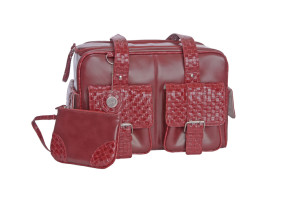
Almost 90 years after the United States’ women’s suffrage movement, there’s finally a camera bag for women.
No more bland black and tan colors or trying not to be seen in public with your camera bag and equipment.
Prices range from $149.99 to $249.99, most available in either leather or nylon, and are also available in many colors.
The medium sized bag can fit one camera body with two to three medium sized lenses or one large telephoto lens, while the small bag can fit one camera body and one medium sized lens. Both have adequate space for your standard photographic accessories.
Memory cards are now coming in absurdly large sizes. Compact flash cards are available up to 64gb capacity and SD cards come as large as 32gb. Unless you’re doing high-def video, a memory card of that size is total overkill. Instead of getting one large memory card, I suggest multiple smaller cards. Don’t bring one 8gb SD card with you on vacation – instead bring either 2 4gb card or 4 2gb cards. The more the merrier. Imagine taking 1000 images during your once-in-a-lifetime Italy vacation and losing or damaging your 8gb card? Doesn’t sound like a good time to me.
When purchasing a new memory card, keep your eyes open for the read/write speed of the memory card itself. Many of the cheaper memory cards are 15 or 20x read/write speed. A memory card of that speed will greatly increase the time between taking photos on a digital camera – a VERY common complaint amongst consumers. Make sure you get a card that’s at least 60x speed. Again, with this one, the more the merrier. Faster cards = more money, but it’s worth the price.
Tomorrow at Gallery 270 will be the opening of Peter Liepke’s “Cities & Dreams”.
Click here to discover all about the gum bichromate photo process that Peter uses for his images.
Numerous cameras nowadays have the option to either create images in a JPEG format or an uncompressed format, such as RAW or TIFF. I’ve been asked many times to suggest the best format for image files. In a way it’s a lot like choosing a camera – it all depends on what you’re going to do with it.
Yes, over time JPEG files will break down, but only if you open the file, edit it, and re-save it again as a JPEG. Simply opening a JPEG file will not cause it to lose information. JPEG files are considered lossy files – the computer will discard what it deems useless or unnecessary information.
On the other hand, uncompressed files do not lose information, no matter how much work you do to it. They’re much larger files but can retain all of it’s original information. There is a slight difference in the initial image quality when shooting in RAW – there will be more information retained in the highlights and shadows and a slight boost in your color information.
RAW files require additional software (as well as additional editing time) in order to be printed. Always keep that in mind when shooting in RAW. If you shoot 300 images from your summer vacation in RAW be prepared to convert every single one of those files to JPEG before then can be printed.
Do you like to print on your own? Do you want to get knee deep in the photo editing process? Then an uncompressed format is right for you.
Not much of a computer person? Would you prefer sending your images to get printed at a lab? Then JPEG is for you.
Both JPEG and RAW work for me. It all depends on the occasion.

Ever take a picture and have it look like this? Hopefully not. This is an extreme case of sensor dust and probably not half as bad as you’ll ever see. Dust is a part of everyday life and getting it on a digital SLR’s imaging sensor is a problem that every photographer has to deal with.
A DSLR’s sensor has an electronic charge and just like a tube television, it loves dust. Changing lenses, zooming, even something as minute as focusing can bring dust into the camera. I find the best way to determine exactly how much dust is on your sensor is to take a photo of the sky at f16 or higher. Also make sure your camera is set to manual focus – otherwise the lens is going to keep seeking for a focus point. Next, load up your image in photoshop and enlarge it to 100%. That’ll give you the ability to see every tiny bit of dust that’s plaguing your sensor. Don’t worry if there’s a Boeing 747 on your sensor – it’s most likely just in the sky.
So now that you see the dust, what do you do with it? There’s always the option of cloning out all the dust in photoshop, but that’s an hour’s worth of time that’s better spent behind the camera. If you have the courage you can clean the sensor yourself with the right equipment and supplies.
If you decide to try it yourself, check to see if your camera has a “clean sensor” option under the set-up menu. Many DSLR’s require you to have a fully charged battery in order to clean the sensor. If the “clean sensor” option is greyed out, that is most likely the case. Charge your battery fully and give it another go. If you have an older SLR, it is possible that it does not have a “clean sensor” option. At that point, in order to access the sensor yourself, your only option is to put the shutter on bulb and clean it that way. It’s a way to do it but it’s very risky. If you accidentally release that shutter while cleaning it’s going to be a costly repair. Also the sensor will be activated, which will increase the chances of more dust appearing.
Okay, so now you have access to the sensor. What now? Whatever you do, DO NOT use compressed air to clean your sensor. Many types of compressed air emit tiny particles of liquid propellant which can damage your sensor. Always use products meant specifically for sensor cleaning, such as Sensor Swabs and E2 solution by a company called Photographic Solutions. Bulb blowers are a great way to do a quick cleaning – never do a wet cleaning unless it is absolutely necessary. You can even buy small, travel-friendly bulb blowers for cleaning on the go.
There’s nothing wrong with wanting to try it yourself, but be aware – Some camera manufacterer’s warranties become void if you clean the sensor yourself.
If you’re having dust problems please feel free to stop by the store. If you’d like to purchase the cleaning products and try it yourself we’d be more than happy to walk you through the process. If you’re more of the butterfingers type and don’t want to risk it, bring your camera into the store and we can clean it for you.
Within the past few years high definition has become more commonplace than ever before. HD televisions are constantly dropping in price as well as getting better in terms of image quality and design. The same is occuring within the consumer camcorder market.
The obvious advantage of a high definition camcorder is that it is able to record and display video at more than double the resolution of a standard definition camcorder – depending on the camcorder, of course. SD (standard definition) video displays 480 horizontal lines of resolution at any given time. HD video can display up to 1080 horizontal lines of resolution at any point.
Within the consumer camcorder market there are two types of resolution currently available – 720p and 1080i. 1080i sounds better, right? Not really. If we were talking still photo resolution that would be the case but with video it’s a different story. The “i” and “p” come into play when we start talking about motion. The “i” stands for interlaced. When recording or playing video that’s interlaced the display (or camcorder) assigns each alternating line of resolution into odds and evens. It first displays the odd lines and then the even lines – each line being refreshed 30 times per second. This is occuring so fast that the human eye is not able to percieve the lag time. If you pause interlaced video you’ll see what the video industry justly calls “jaggies”*.
The “p” stands for progressive. Progressive video refreshes the entire picture 30 times a second. This type of video will alway produce smoother motion.
Many of the newer LCD and plasma televisions will display at 1080p but, as of this writing, there aren’t many consumer camcorders on the market that can record at that resolution.
Now let’s get into the fun stuff. Depending on what type of high def camcorder you purchase there are different types or “formats” of video that it might record in. A HD MiniDV camcorder will record in a format called HDV. HDV is the eldest of the HD crowd and is widely compatible with different types of editing software.
AVCHD is the most popular of the compression formats and is used in almost all non-cassette format camcorders. Though AVCHD may be the future of high-def video there are still many improvements that need to be made. It is still very unfriendly when it comes to editing software and certain types of computer systems. Always double check your software and system specifications before investing in this type of high-def camcorder.
MPEG-2 Transport Stream is a format that is currently used exclusively in JVC camcorders. The image quality is somewhat poor comparted to it’s AVCHD competition.
AVC/H.264 MPEG-4 is only used in certain Samsung and Sanyo brand cameras. Image quality is decent but it records solely in 720p resolution. I wouldn’t be surprised if this format becomes obsolete when the popularity of 1080 resolution rises. I also can’t see marketing execs falling in love with it’s oh-so-catchy title.
High-def video is the way of the future. It’s actually more like “the way of the now” but who’s counting? Depending on what type of video you’re looking to record (and of course what you’re looking to do with it afterwards) going high-def will ensure your video future will not be behind the times.
* Yes, that’s a technical term – as is “jagginess”.
Check us out on Facebook – become a fan!