How to Get White Snow – Winter Shooting Tips

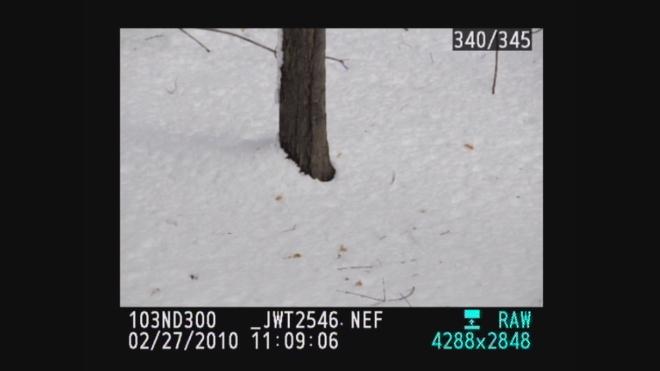
White snow with camera at plus 1

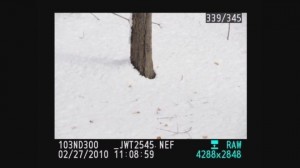
Why is my snow grey

Predominantly white scenes ( think Snow, white sand beaches, clouds )will be moved toward grey so we must over expose from .5 – 1.5 stops to get true white by using the +/-.
Predominantly black scenes ( think black cars, black buildings, black sand beaches )will be moved toward grey so we must under expose .5 – 1.5 stops to get true black by using the +/-.
 A future tutorial will explain how to get perfect exposures using a grey card.

Using histograms to further understand

For those familiar with histograms we can further look into diagnosing our exposure. The histograms are shown below with both our camera exposure and with exposure compensation set on + 1.0. Histograms are available in almost any digital camera including point and shoots and most imaging programs like Photoshop Elements.

A histogram is just a map of the tonal values in our image from black (left most point) to white (right most point) with the height representing how much of the image is at a particular level of brightness. Your histogram will look the same in camera and when you open that image up in your imaging program.


^Black                   Middle^Grey                        White^
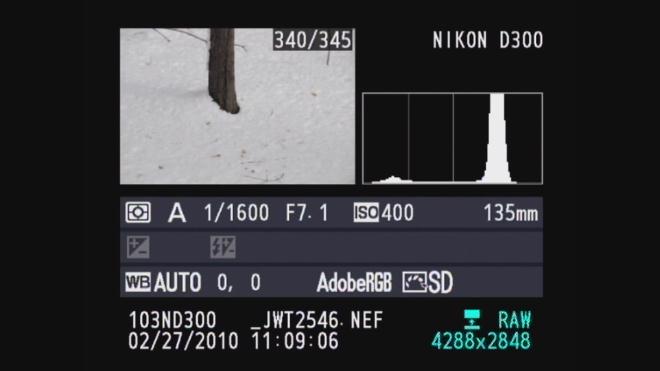
Grey snow historgram - normal exposure

In the grey snow example above our histogram has a good deal of room before the white point on the right so the image represented by this histogram is a shade of grey not white. By overexposing one stop ( +/- +1.0) the camera automatically adjusts and allows 1 extra stop or twice the amount of light. As you can see from the histogram below we still have a small amount of room before the white point (this room indicates we have not blown out our highlights. If this histogram started all the way to the right and did not build to a peak, this would indicate over exposure and blown out highlights. The fix would be to reduce the exposure compensation from +1.0 to +0.7 and check again. The peak will move to the left each time you reduce your exposure. More on histograms in an upcoming tutorial.

White snow when overexposed histogram

Please let us know what you think of this tutorial and let us know what else is causing a challenge in your photography.


 

Phones with cameras and cameras with phones and so on and so on…

I’ve had a lot of customers stop by the shop recently and ask if we can print photos that they’d taken with their cell phone. It’s definitely a do-able process, though it’s not easy.

First and foremost, your image quality is going to be sloppy at best. The imaging sensor in cell phone cameras is small – smaller than any pocket sized digital camera. Even at 4×6 it’s going to be an extremely pixelated photo. Cell phone images are generally meant for sending in phone messages or uploading to the net.

If you aboslutely need to print an image from your cell phone, check to see if your phone will accept a memory card. Most modern, mid-to-high end cell phones will take some type of removeable flash memory. If that’s the case, get the images copied over to the memory card and we can pop it into one of our photo kiosks and make some prints that way. Nice and simple.

If your camera doesn’t take a memory card, your next best option is to get it onto your computer and email it to the store. Getting it to your computer is the hard part – you need to make sure you have the correct cables and/or wireless connection. Some phones and computers are able to connect to one another via Bluetooth, which is a quick and easy way of transferring files.

Memory Cards – Speeds, Sizes, etc.

Memory cards are now coming in absurdly large sizes. Compact flash cards are available up to 64gb capacity and SD cards come as large as 32gb. Unless you’re doing high-def video, a memory card of that size is total overkill. Instead of getting one large memory card, I suggest multiple smaller cards. Don’t bring one 8gb SD card with you on vacation – instead bring either 2 4gb card or 4 2gb cards. The more the merrier. Imagine taking 1000 images during your once-in-a-lifetime Italy vacation and losing or damaging your 8gb card? Doesn’t sound like a good time to me.

When purchasing a new memory card, keep your eyes open for the read/write speed of the memory card itself. Many of the cheaper memory cards are 15 or 20x read/write speed. A memory card of that speed will greatly increase the time between taking photos on a digital camera – a VERY common complaint amongst consumers. Make sure you get a card that’s at least 60x speed. Again, with this one, the more the merrier. Faster cards = more money, but it’s worth the price.

Do JPEG’s break down?

Numerous cameras nowadays have the option to either create images in a JPEG format or an uncompressed format, such as RAW or TIFF. I’ve been asked many times to suggest the best format for image files. In a way it’s a lot like choosing a camera – it all depends on what you’re going to do with it.

Yes, over time JPEG files will break down, but only if you open the file, edit it, and re-save it again as a JPEG. Simply opening a JPEG file will not cause it to lose information. JPEG files are considered lossy files – the computer will discard what it deems useless or unnecessary information.

On the other hand, uncompressed files do not lose information, no matter how much work you do to it. They’re much larger files but can retain all of it’s original information. There is a slight difference in the initial image quality when shooting in RAW – there will be more information retained in the highlights and shadows and a slight boost in your color information.

RAW files require additional software (as well as additional editing time) in order to be printed. Always keep that in mind when shooting in RAW. If you shoot 300 images from your summer vacation in RAW be prepared to convert every single one of those files to JPEG before then can be printed.

Do you like to print on your own? Do you want to get knee deep in the photo editing process? Then an uncompressed format is right for you.

Not much of a computer person? Would you prefer sending your images to get printed at a lab? Then JPEG is for you.

Both JPEG and RAW work for me. It all depends on the occasion.